
Triage Zendesk tickets
in ChatGPT
Get an internal note, a customer reply draft, and suggested tags and priority—then apply to Zendesk after review.
Review first
No auto-send
How it works
Three simple steps to faster, more consistent support responses.
Connect Zendesk
Securely link your Zendesk account using OAuth. No passwords stored, just a secure token exchange.
Pick a ticket and generate drafts
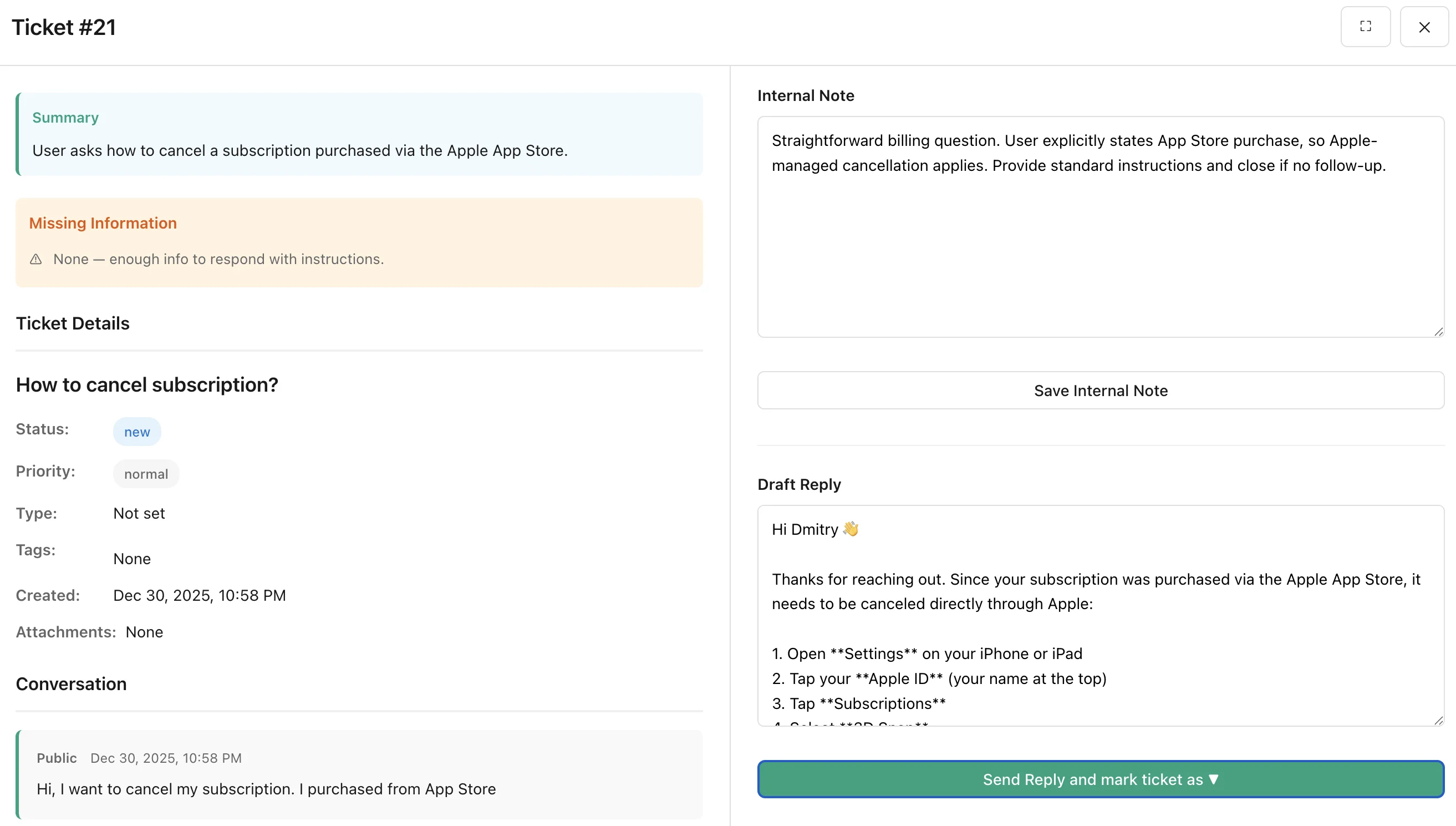
Select any open ticket. ChatGPT analyzes the conversation and generates an internal note plus a reply draft.
Review and apply to Zendesk
Review the suggested updates. Nothing is written back to Zendesk until you explicitly approve.
Key features
Everything you need to respond faster and more consistently.
Ticket summary as internal note
Get a concise summary of the ticket context that you can add as an internal note for your team.
Draft public reply in your tone
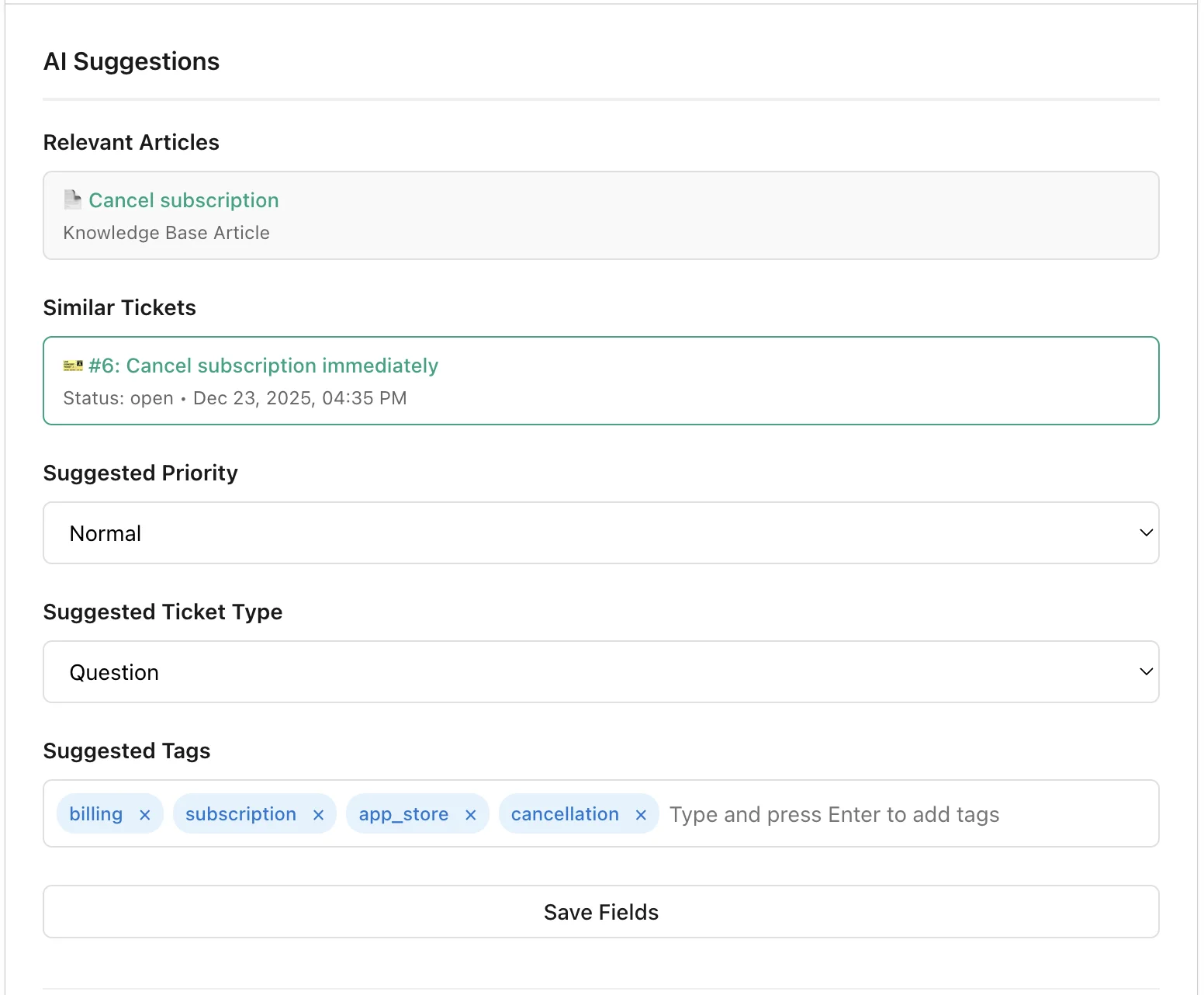
AI-generated customer response based on your documentation and similar tickets
Suggested tags and priority
When confident, the app suggests appropriate tags and priority levels based on ticket content.
One ticket at a time, keeps context
Focus on a single ticket to maintain full context and provide the most accurate assistance.
Safety and control
Built with security-first principles. Your data stays protected, and you maintain full control over every action.
Explicit approval before writeback
Every change requires your confirmation. Nothing is written to Zendesk automatically—you always stay in control.
No password storage (OAuth)
We never see or store your Zendesk password. Authentication uses OAuth tokens that you can revoke anytime.
Common use cases
Perfect for the most frequent support scenarios your team handles daily.
Refund and billing questions
Quickly generate professional responses for payment disputes, refund requests, and billing clarifications.
Bug reports and outages
Draft acknowledgment responses and create clear internal notes summarizing technical issues reported by customers.
Account access and login issues
Help customers with password resets, account recovery, and access-related troubleshooting with templated responses.
Cancellations and plan changes
Handle subscription modifications, retention conversations, and account closure requests professionally.
Frequently asked questions
Everything you need to know about the app.
No. The app never sends messages or makes changes to Zendesk automatically. Every action—adding internal notes, sending replies, updating tags or priority—requires your explicit approval. You review all suggestions before anything is written back to your tickets.
When you approve an action, the app can add internal notes, send public replies, update ticket tags, change priority levels, and set ticket type. All changes are visible in Zendesk's ticket history with clear attribution.
We store only OAuth tokens needed to access your Zendesk account on your behalf. Ticket data is processed in real-time and not stored on our servers. Your Zendesk password is never seen or stored—authentication uses secure OAuth token exchange.
The app works with Zendesk Support (ticketing) and integrates with Zendesk Help Center for knowledge base article suggestions. Other Zendesk products like Chat, Talk, or Sell are not currently supported.
Ready to speed up your support?
Start triaging tickets faster with AI-powered drafts and suggestions. No commitment required.
Get the ChatGPT appQuestions? Email us at support@petprojectcofounder.ai